Hexagonal architecture (ports and adapters)
The domain in the middle, talking to the outside world only through ports and adapters.
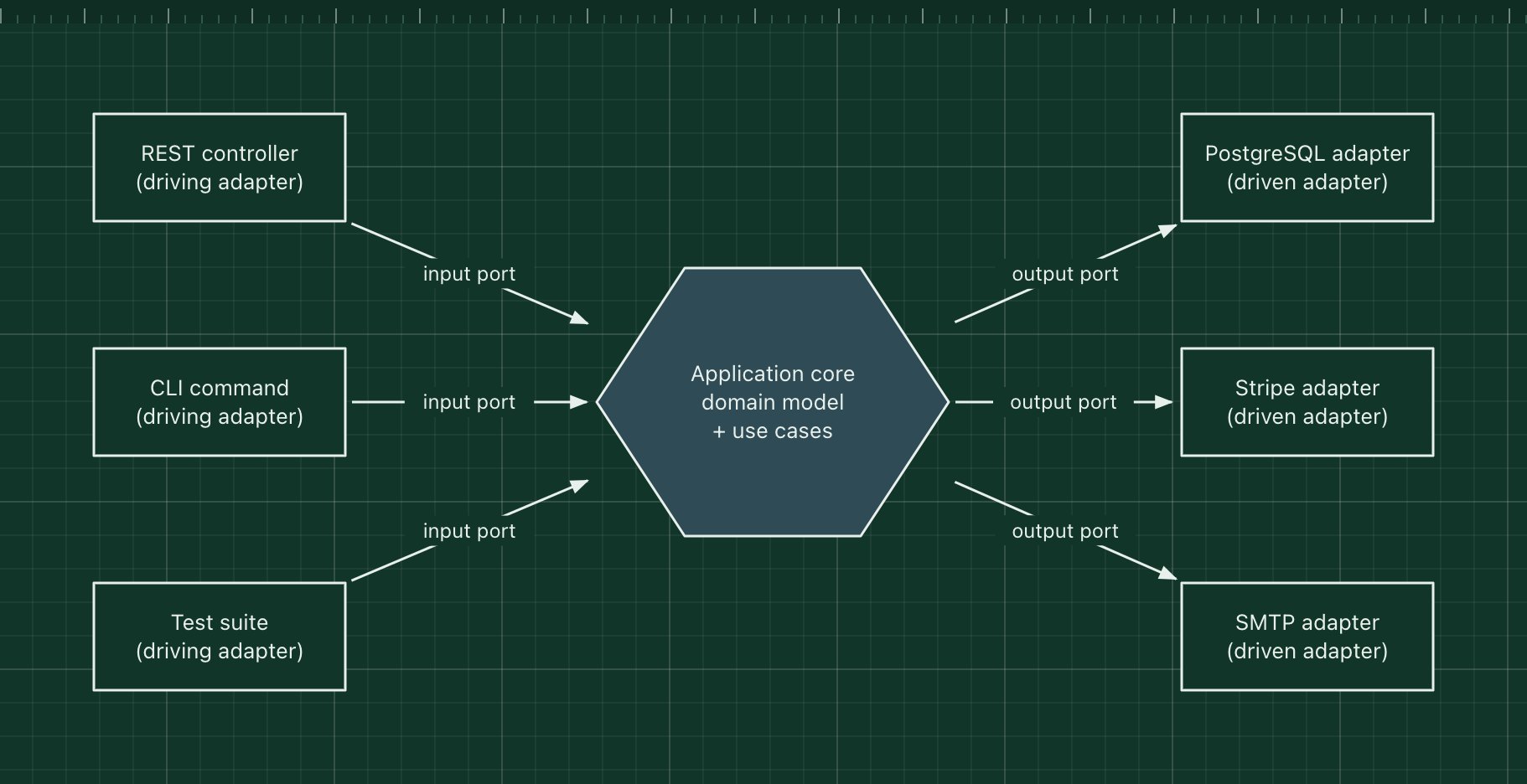
Hexagonal architecture, also called ports and adapters, puts the business logic in the middle and keeps every technology at the edge. The core defines ports: interfaces for what it offers (input ports) and for what it needs (output ports). Adapters plug into those ports to connect a real HTTP framework, database or payment provider.
Because the core depends only on its own interfaces, you can run it from a test with in-memory adapters, change the database or replace the payment provider without touching a business rule. Alistair Cockburn described it in 2005; the hexagon has no meaning beyond "many sides, all equal".
The parts of the pattern
- Application core
- Entities and use cases. Plain code with no framework or database imports.
- Input (driving) ports
- Interfaces such as PlaceOrder that the outside world calls.
- Driving adapters
- A REST controller, a CLI command or a test that translates its input into a port call.
- Output (driven) ports
- Interfaces the core needs, such as OrderRepository or PaymentGateway, defined by the core.
- Driven adapters
- Implementations of those interfaces: PostgreSQL, Stripe, SMTP, or fakes in tests.
How it works
- An HTTP request reaches the REST adapter, which turns it into a PlaceOrder command.
- The adapter calls the input port; the use case in the core runs the business rules.
- The use case saves the order through the OrderRepository port and charges through the PaymentGateway port.
- The PostgreSQL and Stripe adapters, wired in at start-up, do the actual work.
When to use it, and when not to
Good fit
- The domain logic is the valuable, long-lived part and the technologies around it will change.
- You want fast tests of business rules without a database or network.
- The same core is driven from several places: an API, a queue consumer, a CLI.
Think twice
- Simple CRUD with little logic: the extra interfaces add work and no value.
- A team new to the idea and short on time: it is easy to create ports for everything and drown in indirection.
Edit this diagram
Click Open the diagram in the editor to get your own copy, saved in your browser. Rename the boxes to match your system, swap the generic boxes for technology icons from the palette, then export a PNG, SVG or PDF, or share a link. No sign-up.