Three-tier web application architecture diagram
A three-tier architecture splits an application into a presentation tier, an application tier and a data tier, each running on its own servers and usually in its own network subnet. Only the web tier is reachable from the internet; everything behind it talks over private addresses.
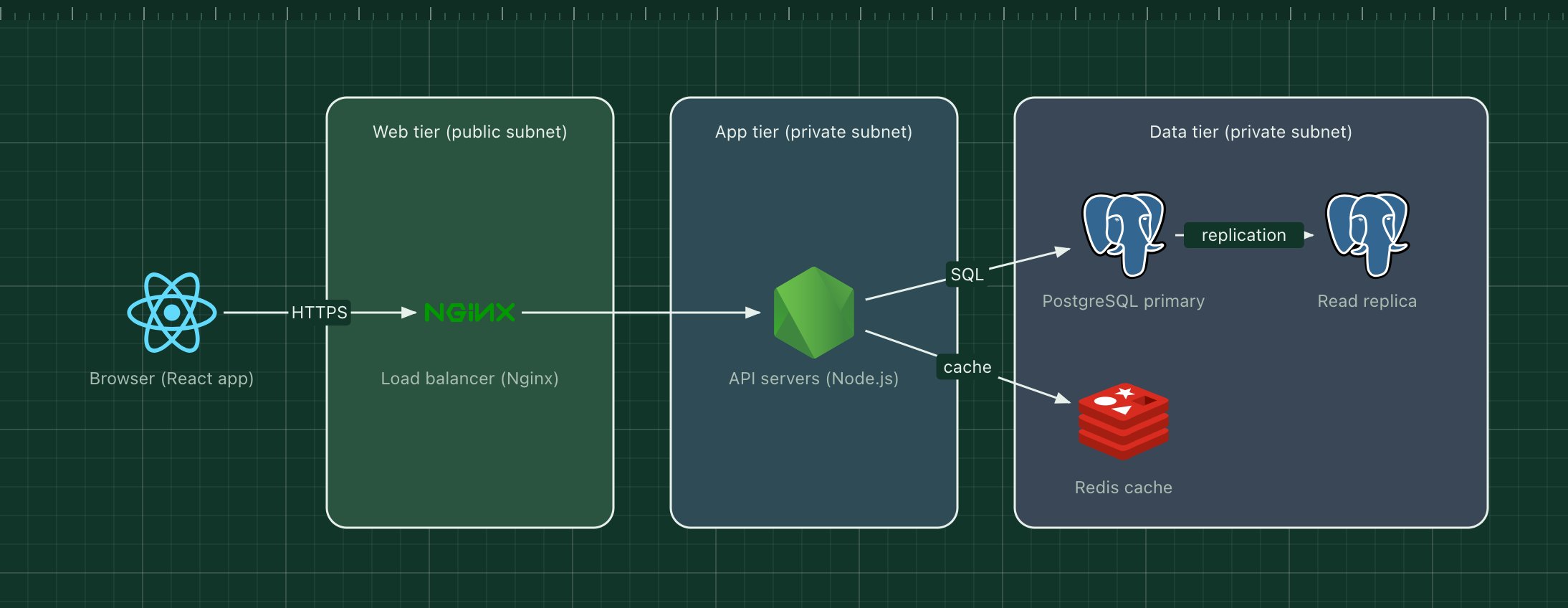
This template shows the version most teams start with: a single-page React app, an Nginx load balancer, a pool of stateless Node.js API servers, PostgreSQL with a read replica, and Redis as a cache.
What's in the diagram
- Browser (React app)
- The client. It loads the static bundle once and then calls the API over HTTPS.
- Load balancer (Nginx)
- Terminates TLS and spreads requests across the API servers. It is the only component with a public address.
- API servers (Node.js)
- Stateless application servers. Because they keep no session state, you can add or remove instances freely behind the load balancer.
- PostgreSQL primary
- The system of record. All writes go here.
- Read replica
- A streaming copy of the primary that serves read-heavy queries and can be promoted if the primary fails.
- Redis cache
- Holds hot data and sessions so repeated reads skip the database.
How a request flows through it
- The browser sends an HTTPS request to the load balancer.
- Nginx forwards it to one of the API servers inside the private subnet.
- The API server checks Redis first. On a cache hit it answers straight away.
- On a miss it queries PostgreSQL, stores the result in Redis and returns the response.
- Writes always go to the primary; the replica receives them through replication a moment later.
When to use this architecture
Use it for most CRUD products, internal tools and SaaS backends with a single team. It is easy to reason about, easy to secure (one public entry point) and scales horizontally at the app tier. When one tier needs to scale or deploy independently of the others, look at the microservices or serverless templates instead.
Ways to adapt the template
- Swap Nginx for a managed load balancer such as an AWS ALB.
- Put a CDN in front of the browser tier to serve the static bundle.
- Replace Node.js with Go, Python or Java: the shape of the diagram does not change.
- Add a second availability zone by duplicating the app and data tiers.
How to customise this diagram
- Open your copy. Click Open in the editor. The template opens as your own project, saved in your browser. Nothing is uploaded.
- Rename the parts. Double-click any label, such as “Browser (React app)”, type your own name, then click outside it. Arrow labels work the same way.
- Swap a technology. Select Browser (React app) and press Delete. Search the icon palette for the technology you use, drag it onto the board, and reconnect it by dragging its arrow handle onto the next component.
- Add what is missing. Drag more icons or shapes onto the board. Shapes include databases, servers, users, queues, mail, alerts and scheduled jobs.
- Adjust the zones. Zones are rounded rectangles with a fill colour. Resize them to fit, pick another colour from the selection bar, and press [ to send a zone behind the components.
- Export or share. Save the diagram as a PNG with the camera button, download the project as JSON with Export, or copy a link with Share.