FastAPI backend with Celery workers architecture diagram
FastAPI is a Python web framework built on type hints and async I/O. It answers HTTP requests quickly, but anything slow, such as sending email, generating PDFs or calling a third-party API, should not happen while the user waits.
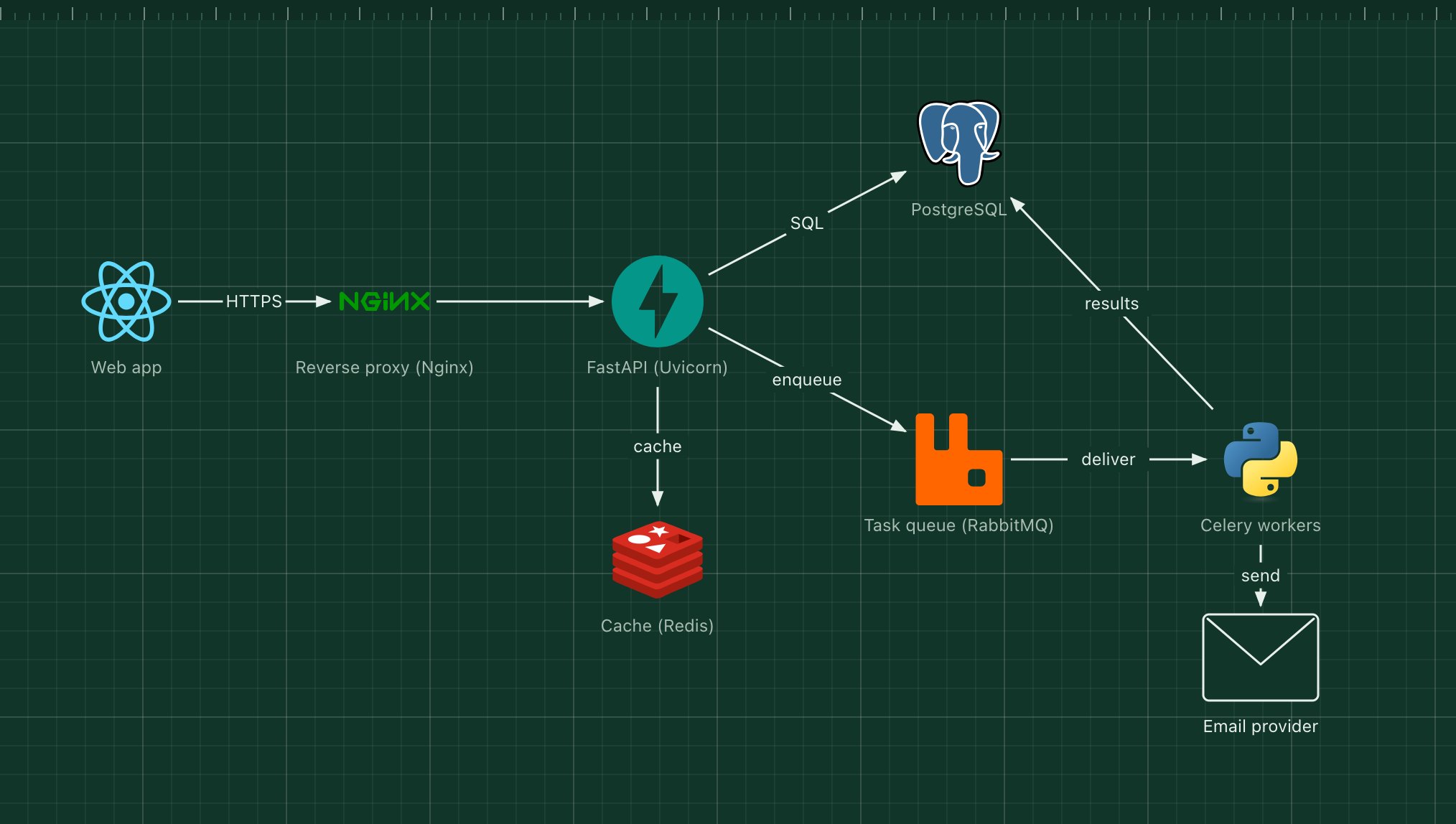
This template pairs FastAPI with Celery: the API puts a task on a RabbitMQ queue and returns at once, and a pool of worker processes does the work in the background.
What's in the diagram
- Reverse proxy (Nginx)
- Terminates TLS, serves static files and forwards API requests to Uvicorn.
- FastAPI (Uvicorn)
- Validates requests with Pydantic models, talks to the database and enqueues background tasks.
- PostgreSQL
- The main database, accessed through SQLAlchemy or a similar library.
- Cache (Redis)
- Caches expensive reads and can also store Celery task results.
- Task queue (RabbitMQ)
- Holds tasks until a worker is free, and redelivers them if a worker crashes.
- Celery workers
- Separate Python processes that run tasks, retry failures and record results.
How a request flows through it
- The browser posts a request, for example "export my invoices".
- FastAPI validates it, writes a job record to PostgreSQL and enqueues a Celery task.
- The API returns 202 Accepted with the job ID straight away.
- A worker picks the task from RabbitMQ, builds the export and stores the result.
- The worker emails a download link, and the app can poll the job ID for its status.
When to use this architecture
Use it for Python backends where some requests trigger work that takes seconds or minutes, or must be retried. If every request is fast, drop the queue and workers; if you already run Kubernetes, the same split maps to separate API and worker deployments.
Ways to adapt the template
- Use Redis as both the broker and the result backend to run one service fewer.
- Add Celery beat for scheduled tasks.
- Run the API and workers from one Docker image with different commands.
- Add Flower or Prometheus metrics to watch queue length and task failures.
How to customise this diagram
- Open your copy. Click Open in the editor. The template opens as your own project, saved in your browser. Nothing is uploaded.
- Rename the parts. Double-click any label, such as “Web app”, type your own name, then click outside it. Arrow labels work the same way.
- Swap a technology. Select Web app and press Delete. Search the icon palette for the technology you use, drag it onto the board, and reconnect it by dragging its arrow handle onto the next component.
- Add what is missing. Drag more icons or shapes onto the board. Shapes include databases, servers, users, queues, mail, alerts and scheduled jobs.
- Group related parts. Draw a rounded rectangle around related components, give it a fill colour from the selection bar, and press [ to send it behind them.
- Export or share. Save the diagram as a PNG with the camera button, download the project as JSON with Export, or copy a link with Share.