Diagrams as code or drawn by hand: when to use which
Text-based diagrams and visual editors solve different problems. Most teams need both.
"Should we use Mermaid or just draw it?" comes up in almost every team that takes documentation seriously. We build a visual editor, so we have an obvious bias. We also use diagrams as code ourselves. Here is how we think about the choice.
What "diagrams as code" means#
With diagrams as code, you describe a diagram in text and a tool renders the picture. The three you will meet most often for architecture are:
- Mermaid: a short syntax for flowcharts, sequence diagrams and more, rendered directly by GitHub, GitLab and many documentation tools.
- PlantUML: an older, very capable text format for UML, with the C4-PlantUML extension for C4 diagrams.
- Structurizr: a model-first approach to the C4 model. You describe the system once and generate several consistent views from it.
A small Mermaid flowchart looks like this:
flowchart LR
  web[Web app] -->|HTTPS| api[Orders API]
  api -->|SQL| db[(Orders DB)]
  api -->|OrderPlaced| bus[[Kafka]]
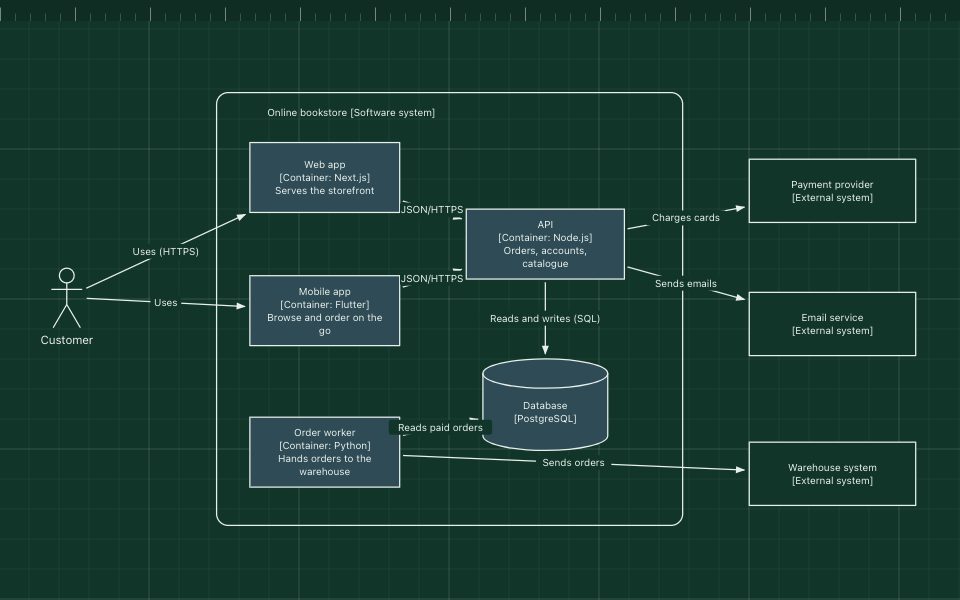
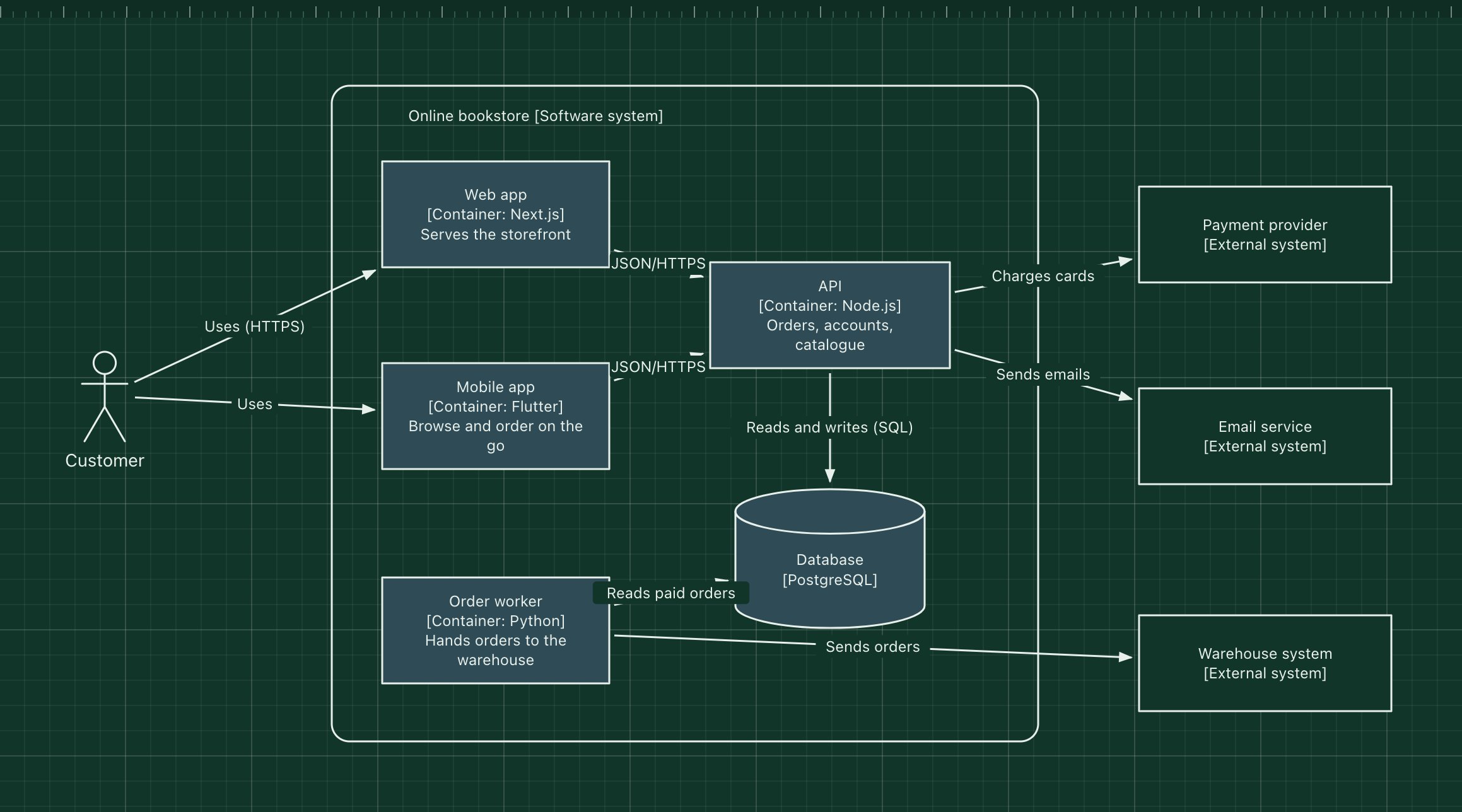
And a C4 container diagram in PlantUML:
@startuml
!include https://raw.githubusercontent.com/plantuml-stdlib/C4-PlantUML/master/C4_Container.puml
Person(user, "Customer")
System_Boundary(shop, "Online bookstore") {
  Container(web, "Web app", "Next.js")
  Container(api, "API", "Node.js")
  ContainerDb(db, "Database", "PostgreSQL")
}
Rel(user, web, "Uses", "HTTPS")
Rel(web, api, "Calls", "JSON/HTTPS")
Rel(api, db, "Reads and writes", "SQL")
@enduml
Where diagrams as code win#
- Review and history. The diagram changes in the same pull request as the code, and reviewers see a readable diff.
- No drift between copies. There is one source file, so there is no question of which PNG is the latest.
- Generated views. With a model, as in Structurizr, renaming a service updates every diagram it appears in.
- Low barrier in docs. A Mermaid block in a README needs no tool at all for readers.
Where they hurt#
- Layout is not yours. The renderer decides where boxes go. Small diagrams look fine; large ones become tangled, and nudging the layout through syntax tricks is frustrating.
- Thinking happens visually. Early in a design, people move boxes around to understand the problem. Typing coordinates of an idea you have not had yet is slow.
- Not everyone writes code. Product managers, designers and security reviewers can read a diagram but often will not edit its source.
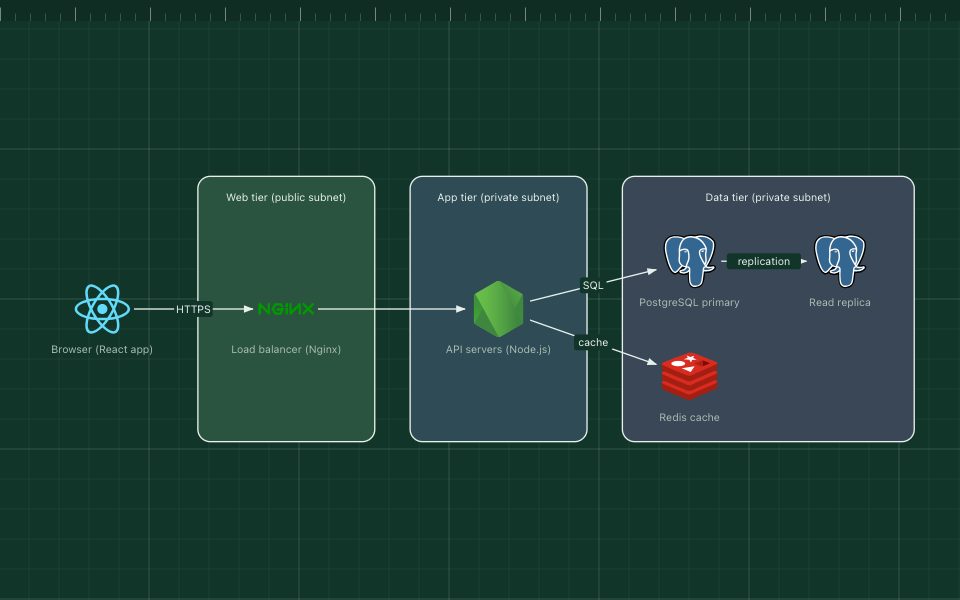
- Polish is limited. Real technology logos, careful grouping and a clear visual hierarchy are hard or impossible in most text formats.
Where visual editors win#
A visual editor is better when the diagram is a thinking tool or a communication piece: design sessions, incident reviews, onboarding decks, a diagram for a blog post or a pitch. You see the result as you work, you can arrange it so the main path reads naturally, and anyone in the room can change it.
Where visual editors hurt#
- Drift. A PNG pasted into a wiki stops matching reality quietly.
- Reviewability. A binary or proprietary file in a repo tells reviewers nothing about what changed.
- Lock-in. Diagrams stored only in a vendor's cloud are hard to move or keep.
These are fixable. In ArchBoard, a diagram can be exported as a plain JSON file and committed next to the code, and a share link can live in the README so anyone opens the current version in one click. It is not a text diff, but it is no longer a mystery file.
How teams combine them#
The pattern we see working most often:
- Draw while designing. Use a visual editor in design sessions and early proposals, when the shape of the system is still moving.
- Write down what lasts. Once a structure is settled and changes with the code, such as a C4 model or sequence diagrams for a protocol, move it to code next to the service.
- Keep presentation diagrams visual. Overviews for onboarding, architecture reviews and external audiences stay in the editor, with a date and an owner.
A quick way to choose#
| If the diagram… | Prefer |
|---|---|
| lives in a README and changes with the code | Mermaid |
| documents a C4 model across many systems | Structurizr or C4-PlantUML |
| is a UML sequence or class diagram | PlantUML or Mermaid |
| is for a design session or a whiteboard moment | A visual editor |
| needs real logos and a careful layout | A visual editor |
| is read by non-engineers | Either, as long as it is rendered |
There is no wrong answer, only a mismatch between the tool and the job. If you want to try the visual side, open any template in the editor: it takes a few seconds and needs no account.