MEAN stack architecture
MERN with Angular in place of React: a full framework on the front end, TypeScript throughout.
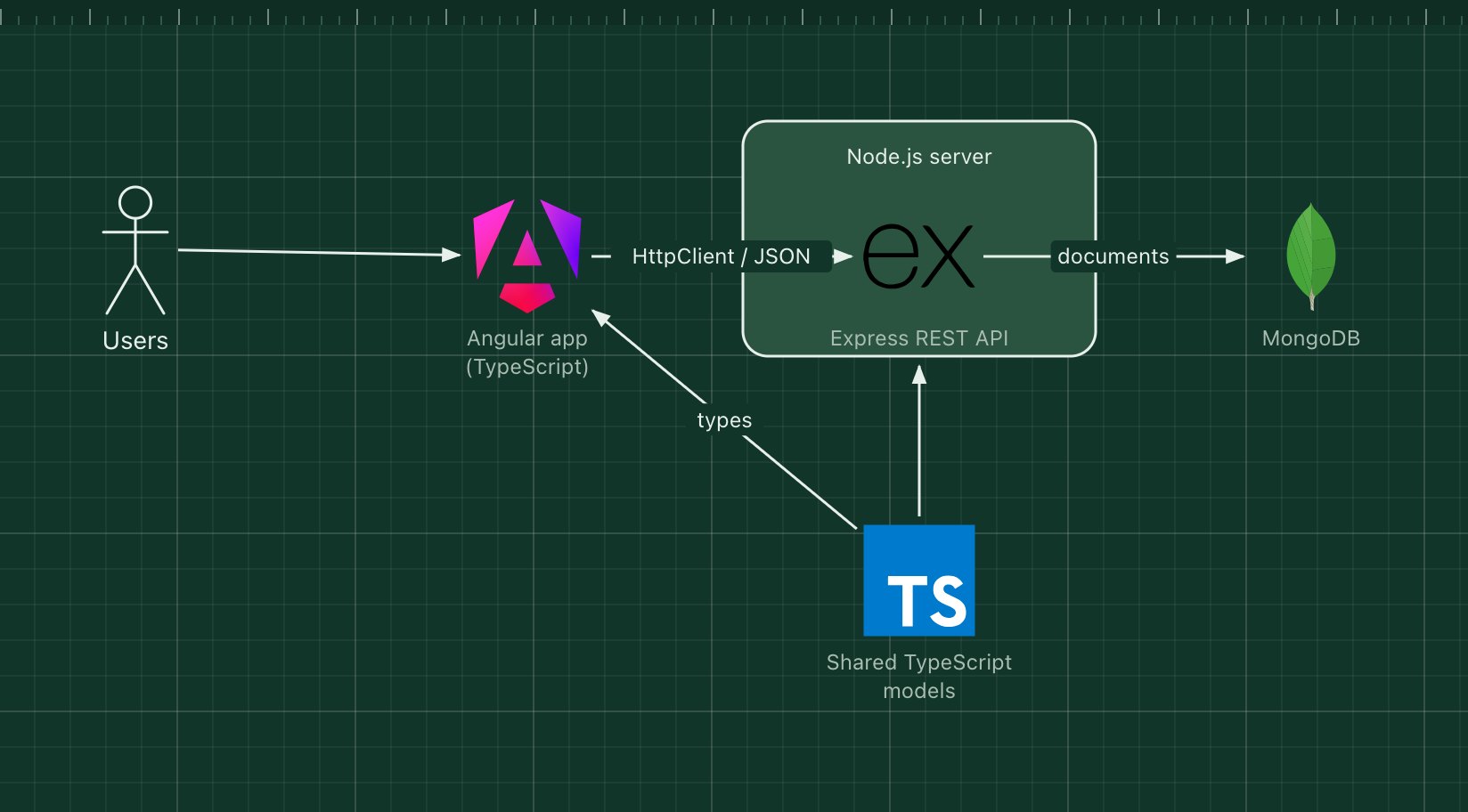
MEAN combines MongoDB, Express, Angular and Node.js. It is the same back end as MERN, with Angular instead of React in the browser. Angular is a complete framework rather than a UI library: it brings routing, forms, HTTP, dependency injection and testing tools, and it is written in TypeScript.
Because both ends can be TypeScript, teams often share model and validation types between the Angular app and the Express API, catching mismatches at build time.
What the stack is made of
- Angular
- The front-end framework. Components, services and an HttpClient that calls the API.
- Express
- REST routes and middleware on Node.js.
- Node.js
- The server runtime.
- MongoDB
- A document database for the API's data.
- Shared TypeScript types
- Interfaces for the API's requests and responses, used on both sides.
How a request flows through it
- The browser loads the compiled Angular app.
- An Angular service calls the Express API through HttpClient.
- Express authenticates the request and runs the route handler.
- The handler reads or writes MongoDB and returns JSON, which Angular binds to the view.
When to use it, and when not to
Good fit
- Large enterprise front ends where Angular's structure and conventions help many developers work alike.
- Teams that want TypeScript and one opinionated framework instead of picking libraries.
- Internal tools and admin apps with many forms.
Think twice
- Small projects where Angular's size and learning curve are more than you need.
- Relational data with complex queries: swap MongoDB for PostgreSQL.
- Content sites that need fast first loads without server-side rendering set up.
Edit this diagram
Click Open the diagram in the editor to get your own copy, saved in your browser. Rename the boxes to match your system, swap any technology for the one you use from the icon palette, then export a PNG, SVG or PDF, or share a link. No sign-up.