Ruby on Rails stack architecture
Convention over configuration: Rails, PostgreSQL, Redis, Sidekiq and Hotwire for interactive pages.
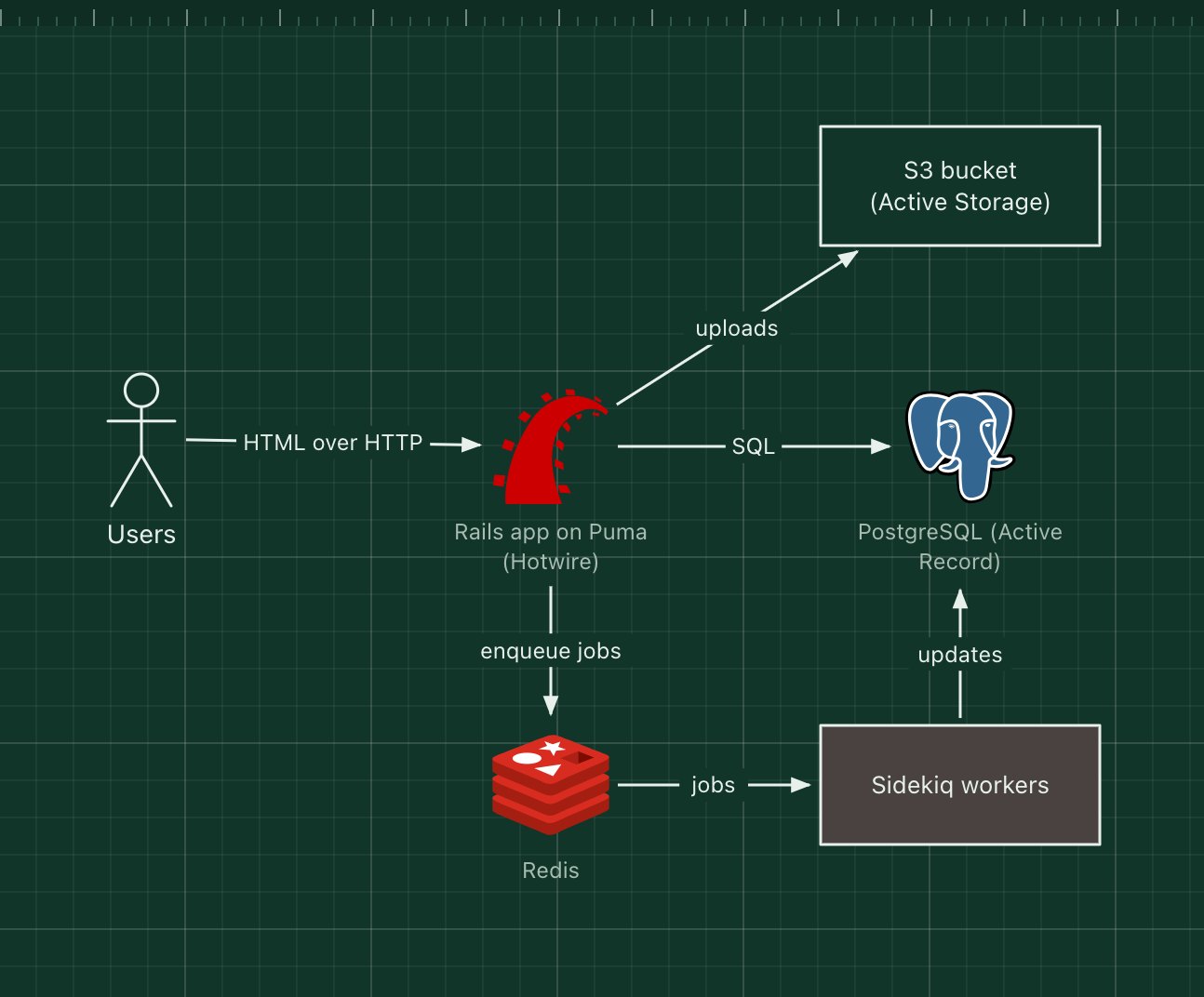
Ruby on Rails is a full-stack web framework built on convention over configuration: follow its naming and folder rules and most of the wiring is done for you. A typical Rails stack runs the app on the Puma server, stores data in PostgreSQL through Active Record, uses Redis with Sidekiq (or the built-in Solid Queue) for background jobs, and Active Storage for file uploads to S3-compatible storage.
Modern Rails favours sending HTML over the wire. Hotwire (Turbo and Stimulus) updates parts of the page from server-rendered HTML, so you get interactive pages without a separate single-page app. Shopify, GitHub and Basecamp run on Rails.
What the stack is made of
- Rails on Puma
- Routes, controllers, Active Record models and views.
- Hotwire
- Turbo swaps page fragments rendered on the server; Stimulus adds small JavaScript behaviours.
- PostgreSQL
- The database, managed with Active Record migrations.
- Redis and Sidekiq
- A job queue and its workers for emails, exports and webhooks.
- Active Storage
- File uploads to S3, Google Cloud Storage or Azure, with image variants.
How a request flows through it
- A user submits a form; Turbo sends it to a Rails controller.
- The controller saves the record through Active Record to PostgreSQL.
- It enqueues a "send confirmation" job in Redis and responds with a Turbo Stream that updates part of the page.
- A Sidekiq worker sends the email in the background.
When to use it, and when not to
Good fit
- Small teams building a product fast, with server-rendered pages.
- SaaS and marketplace apps with lots of CRUD and admin.
- You value conventions and a mature ecosystem of gems.
Think twice
- CPU-bound services or very low-latency APIs, where Go or Rust fit better.
- A team without Ruby experience on a tight deadline.
Edit this diagram
Click Open the diagram in the editor to get your own copy, saved in your browser. Rename the boxes to match your system, swap any technology for the one you use from the icon palette, then export a PNG, SVG or PDF, or share a link. No sign-up.