Monolith to microservices (strangler fig) architecture diagram
The strangler fig pattern replaces a legacy system gradually. A routing layer sits in front of the monolith, and each time a feature is rebuilt as a new service, its routes are switched over, until nothing is left for the monolith to do.
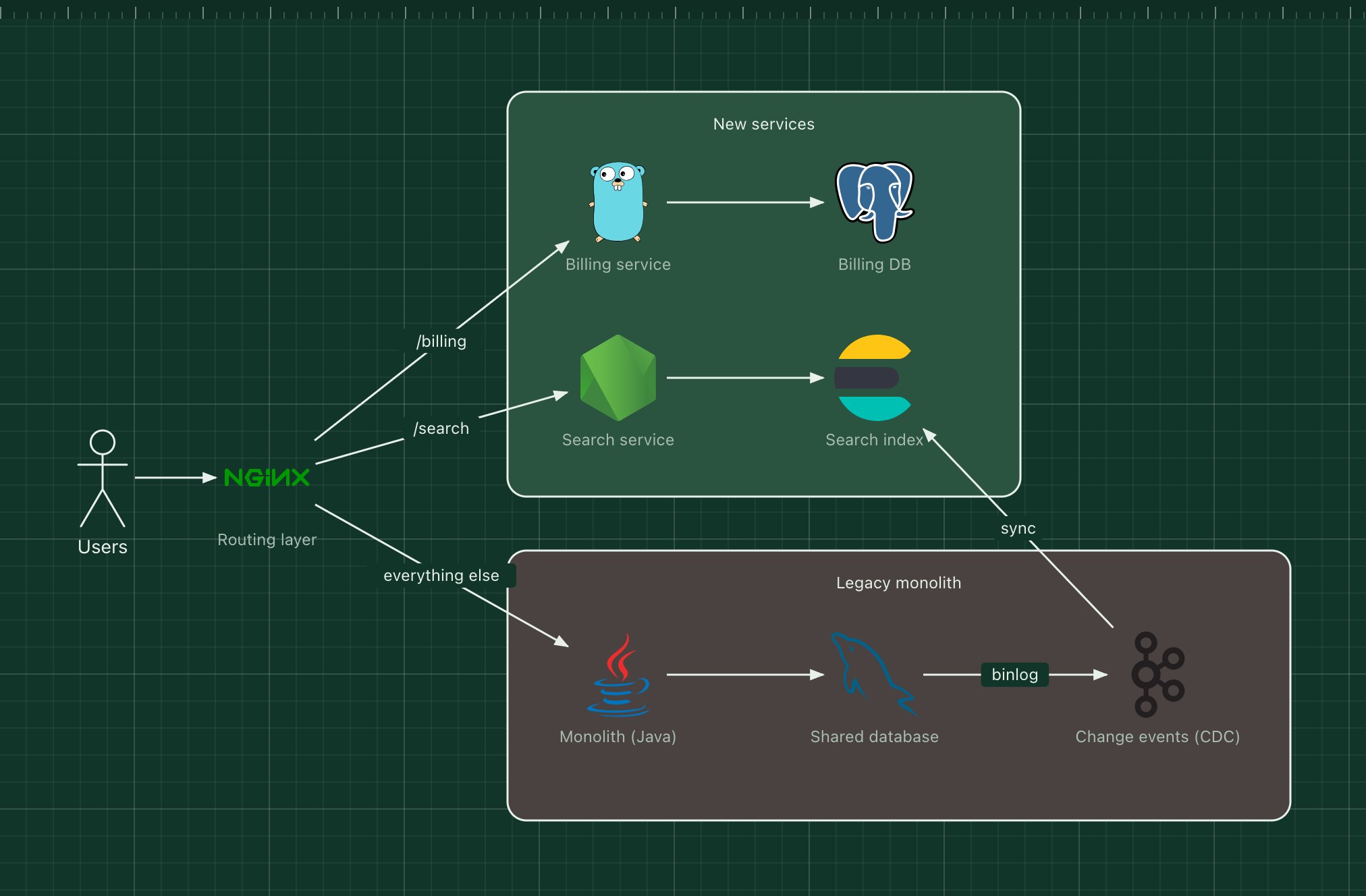
This template shows a migration halfway through: billing and search already run as new services, everything else still goes to the monolith, and change data capture keeps the new search index in sync with the old database.
What's in the diagram
- Routing layer (Nginx)
- Decides per path where each request goes. Moving a feature is a routing change, and so is rolling it back.
- New services
- Billing and search, each with its own data store, built and deployed independently.
- Legacy monolith
- Keeps serving every route that has not moved yet.
- Shared database
- The monolith's database, still the source of truth for data that has not been migrated.
- Change events (CDC)
- Reads the database's change log and publishes each row change, so new services can follow legacy data without changing monolith code.
How a request flows through it
- A request for /billing reaches the routing layer and goes to the new billing service.
- A request for any route not yet migrated goes to the monolith, exactly as before.
- When the monolith changes a product, the database records it in its change log.
- The CDC connector publishes the change to Kafka, and the search service updates its index.
- Once a feature has fully moved, its code and tables are deleted from the monolith.
When to use this architecture
Use it when a monolith is too risky to rewrite in one go but too slow to keep changing. Start with a feature that is valuable, fairly self-contained and well understood, and keep each step reversible at the routing layer.
Ways to adapt the template
- Replace Nginx with an API gateway that also handles authentication.
- Run new and old code side by side and compare results before switching a route.
- Use Debezium as the CDC connector for MySQL or PostgreSQL.
- Add an anti-corruption layer so new services do not inherit the legacy data model.
How to customise this diagram
- Open your copy. Click Open in the editor. The template opens as your own project, saved in your browser. Nothing is uploaded.
- Rename the parts. Double-click any label, such as “Routing layer”, type your own name, then click outside it. Arrow labels work the same way.
- Swap a technology. Select Routing layer and press Delete. Search the icon palette for the technology you use, drag it onto the board, and reconnect it by dragging its arrow handle onto the next component.
- Add what is missing. Drag more icons or shapes onto the board. Shapes include databases, servers, users, queues, mail, alerts and scheduled jobs.
- Adjust the zones. Zones are rounded rectangles with a fill colour. Resize them to fit, pick another colour from the selection bar, and press [ to send a zone behind the components.
- Export or share. Save the diagram as a PNG with the camera button, download the project as JSON with Export, or copy a link with Share.