Serverless web app on Cloudflare architecture diagram
A serverless web app has no servers you patch or scale yourself. Static pages are served from a CDN, and the API runs as functions that start on demand close to the user.
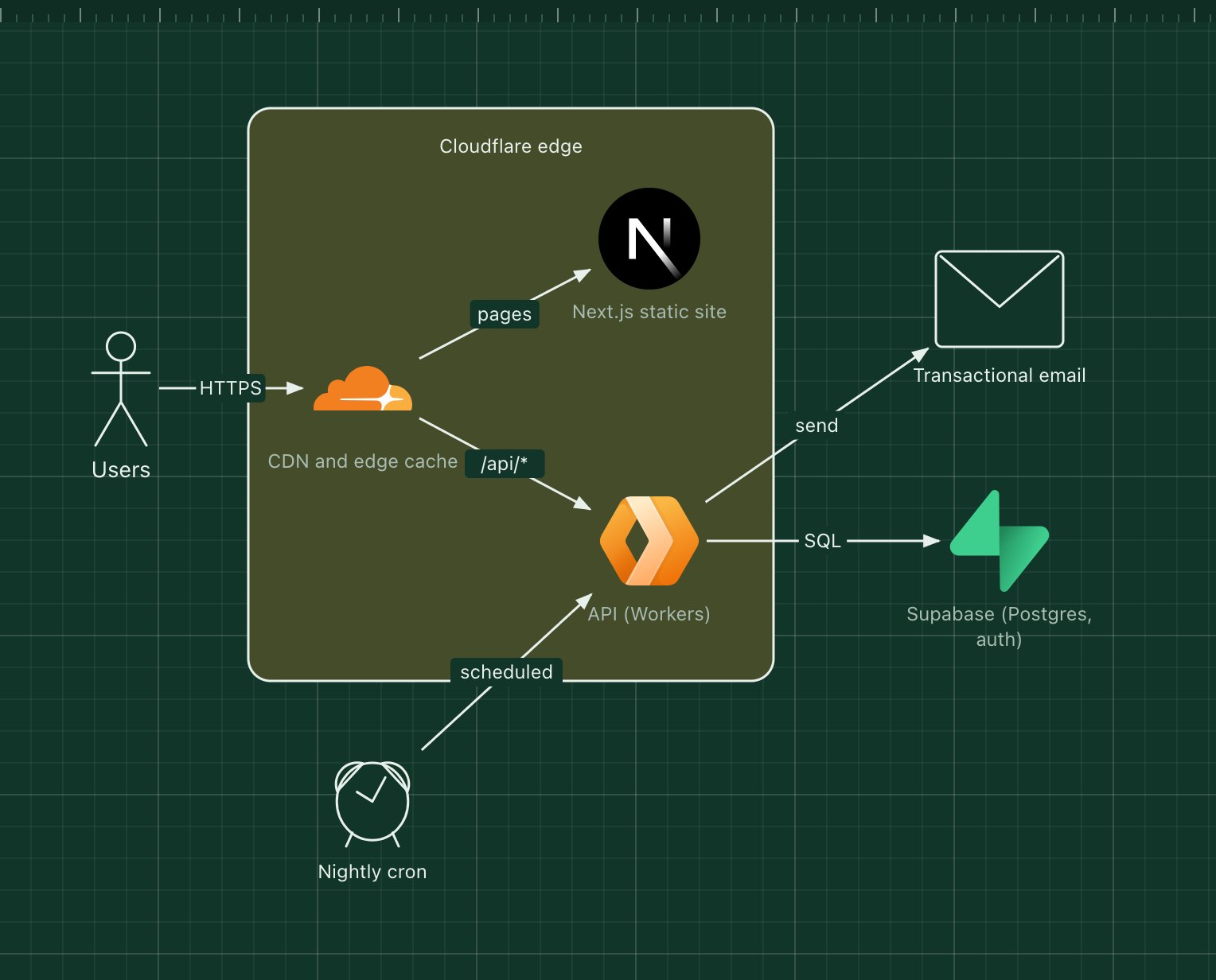
This template uses Cloudflare for both: the CDN serves a statically exported Next.js site, and Cloudflare Workers run the API at the edge, backed by Supabase for Postgres and authentication.
What's in the diagram
- CDN and edge cache
- Serves static files from the location nearest the user and routes /api/* to the Workers.
- Next.js static site
- Pages built ahead of time and deployed as static files.
- API (Workers)
- Short-lived functions that handle API requests. They scale to zero when idle.
- Supabase
- Managed Postgres with authentication and row-level security.
- Transactional email
- An email API the Worker calls for receipts and sign-in links.
- Nightly cron
- A scheduled trigger that runs the same Worker code for clean-up and reports.
How a request flows through it
- The browser requests a page; the CDN answers from cache.
- The page calls /api/... and the CDN routes the call to a Worker.
- The Worker verifies the user's token and queries Supabase.
- When needed it calls the email API, then returns JSON to the page.
- Once a night the cron trigger runs the clean-up job.
When to use this architecture
Use it for products with spiky or unpredictable traffic, small teams that do not want to run servers, and apps whose users are spread around the world. Long-running or CPU-heavy jobs are a poor fit for edge functions; move those to a queue and a worker service.
Ways to adapt the template
- Replace Supabase with Cloudflare D1 or another managed database.
- Host the frontend on Vercel instead and keep the same API.
- Add a queue between the API and email for retries.
- Store uploads in object storage such as Cloudflare R2.
How to customise this diagram
- Open your copy. Click Open in the editor. The template opens as your own project, saved in your browser. Nothing is uploaded.
- Rename the parts. Double-click any label, such as “CDN and edge cache”, type your own name, then click outside it. Arrow labels work the same way.
- Swap a technology. Select CDN and edge cache and press Delete. Search the icon palette for the technology you use, drag it onto the board, and reconnect it by dragging its arrow handle onto the next component.
- Add what is missing. Drag more icons or shapes onto the board. Shapes include databases, servers, users, queues, mail, alerts and scheduled jobs.
- Adjust the zones. Zones are rounded rectangles with a fill colour. Resize them to fit, pick another colour from the selection bar, and press [ to send a zone behind the components.
- Export or share. Save the diagram as a PNG with the camera button, download the project as JSON with Export, or copy a link with Share.