Infrastructure as code with Terraform and Ansible architecture diagram
Infrastructure as code means cloud resources and server configuration are described in files, reviewed like application code, and applied by automation instead of by hand in a console.
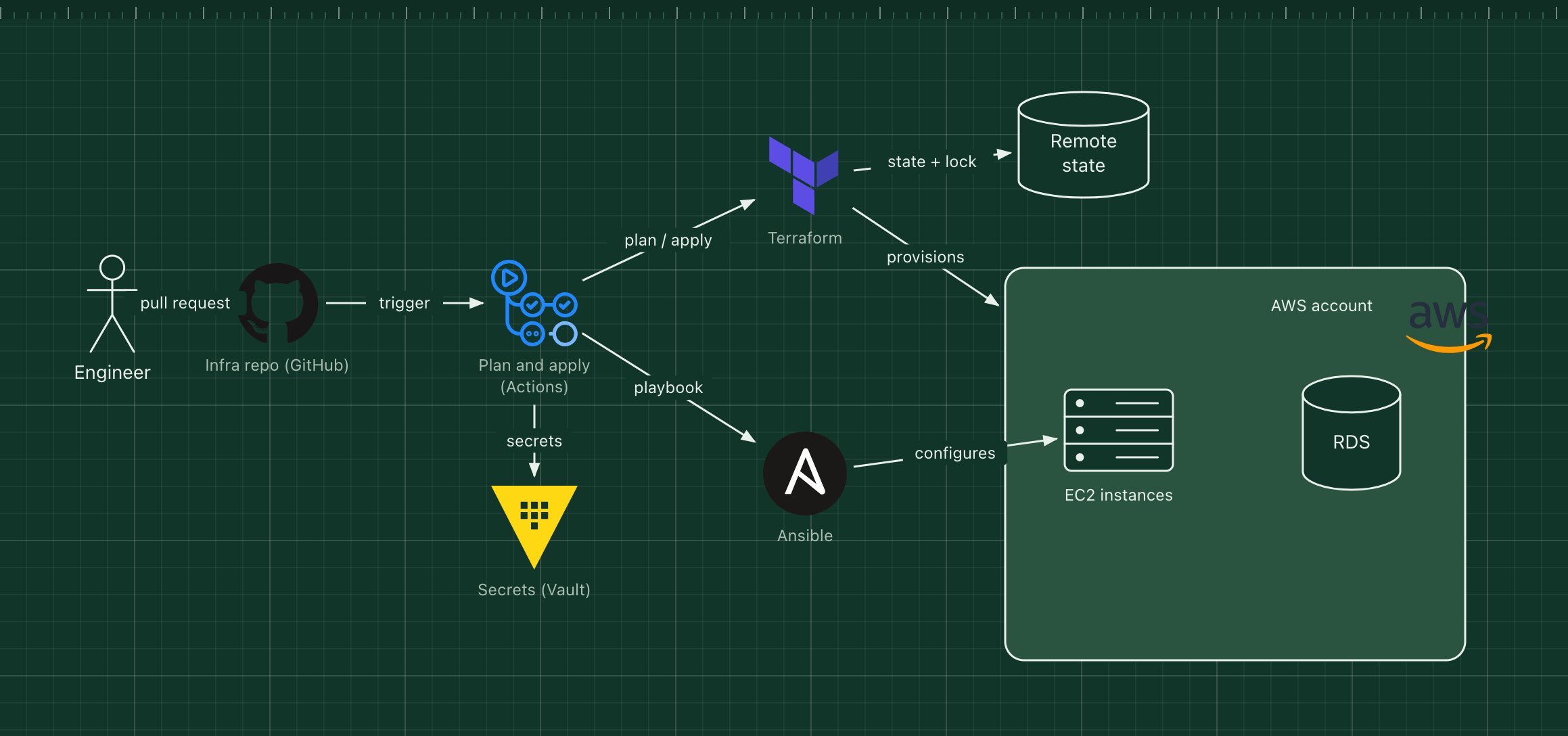
This template uses the common split: Terraform creates and changes cloud resources, Ansible configures what runs on the servers, and Vault provides the secrets both need.
What's in the diagram
- Infra repo (GitHub)
- Terraform modules, Ansible playbooks and the pipeline definition. Every change goes through a pull request.
- GitHub Actions
- Runs terraform plan on each pull request and apply after merge.
- Terraform
- Declares networks, instances, databases and permissions, and works out what needs to change.
- Remote state
- Terraform's record of what exists, stored remotely with a lock so two runs never apply at once.
- Ansible
- Installs packages and configures services on the instances over SSH, without agents.
- Secrets (Vault)
- Short-lived cloud credentials and passwords, fetched at run time instead of stored in the repo.
How a request flows through it
- An engineer opens a pull request that, for example, adds an instance.
- The pipeline fetches credentials from Vault and posts the terraform plan on the pull request for review.
- After approval and merge, the pipeline runs terraform apply, which updates the AWS account and the remote state.
- It then runs the Ansible playbook against the new instances to configure them.
- The repository now describes exactly what is running.
When to use this architecture
Use it as soon as more than one person changes infrastructure, or you need to rebuild an environment reliably. If everything runs in containers on a managed platform, Terraform alone is often enough and Ansible can go.
Ways to adapt the template
- Split state per environment and per component to keep plans small.
- Add policy checks (for example with Open Policy Agent) before apply.
- Replace Ansible with baked machine images built by Packer.
- Use OpenTofu instead of Terraform; the workflow is the same.
How to customise this diagram
- Open your copy. Click Open in the editor. The template opens as your own project, saved in your browser. Nothing is uploaded.
- Rename the parts. Double-click any label, such as “Infra repo (GitHub)”, type your own name, then click outside it. Arrow labels work the same way.
- Swap a technology. Select Infra repo (GitHub) and press Delete. Search the icon palette for the technology you use, drag it onto the board, and reconnect it by dragging its arrow handle onto the next component.
- Add what is missing. Drag more icons or shapes onto the board. Shapes include databases, servers, users, queues, mail, alerts and scheduled jobs.
- Adjust the zones. Zones are rounded rectangles with a fill colour. Resize them to fit, pick another colour from the selection bar, and press [ to send a zone behind the components.
- Export or share. Save the diagram as a PNG with the camera button, download the project as JSON with Export, or copy a link with Share.