Service-oriented architecture (SOA)
Enterprise-wide services connected through a service bus, often in front of legacy systems.
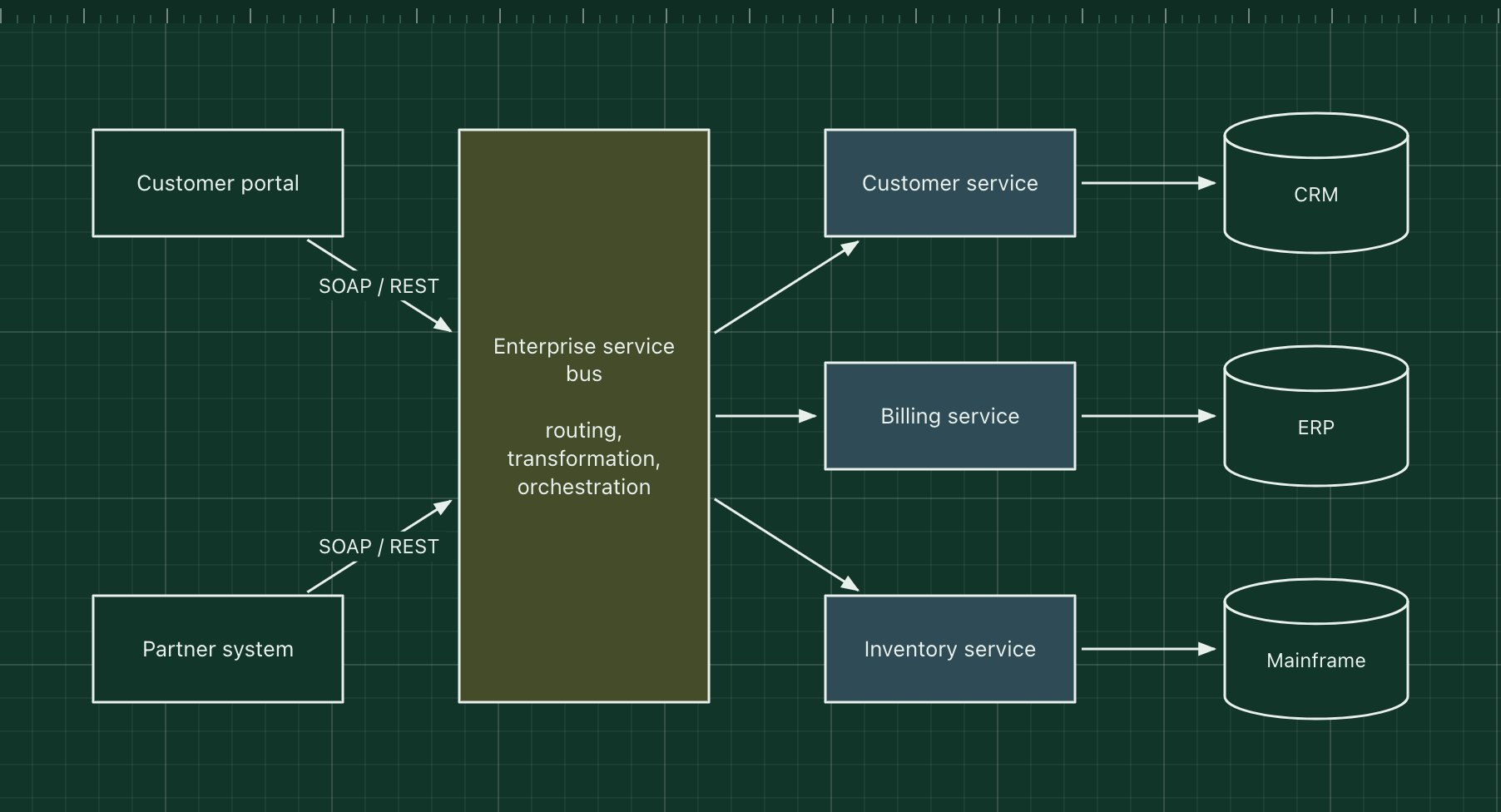
Service-oriented architecture organises an enterprise's software as reusable business services, such as customer, billing or inventory, that many applications share. Services publish formal contracts (traditionally WSDL and SOAP, now often REST), and an enterprise service bus routes, transforms and orchestrates the messages between consumers and services.
SOA came before microservices and shares the idea of services, but it aims at reuse across a whole organisation, often wraps existing systems such as an ERP or a mainframe, and puts a lot of logic in the central bus. Microservices instead keep the pipes dumb and the services small and independently owned.
The parts of the pattern
- Service consumers
- Portals, partner systems and internal apps that call services.
- Enterprise service bus
- Central middleware for routing, protocol conversion, message transformation and orchestration.
- Business services
- Coarse-grained, reusable services with formal contracts.
- Systems of record
- CRM, ERP and mainframe systems that the services expose.
How it works
- The customer portal sends a request to the service bus.
- The bus transforms the message to the service's contract and routes it to the billing service.
- The billing service reads or updates the ERP.
- The bus can orchestrate several services into one business process and return a combined answer.
When to use it, and when not to
Good fit
- Large enterprises integrating many existing systems behind shared, governed interfaces.
- Many applications need the same business capabilities and data.
- Strong central governance of contracts is a requirement.
Think twice
- Teams want to deploy independently: a central bus and shared services become a bottleneck.
- Greenfield products: the governance and middleware cost rarely pays off.
- Business logic creeping into the bus, where it is hard to test and own.
Edit this diagram
Click Open the diagram in the editor to get your own copy, saved in your browser. Rename the boxes to match your system, swap the generic boxes for technology icons from the palette, then export a PNG, SVG or PDF, or share a link. No sign-up.