Event sourcing with CQRS architecture diagram
Event sourcing stores every change to the system as an immutable event, such as AccountOpened or MoneyDeposited, instead of overwriting the current state. The current state is whatever you get by replaying the events.
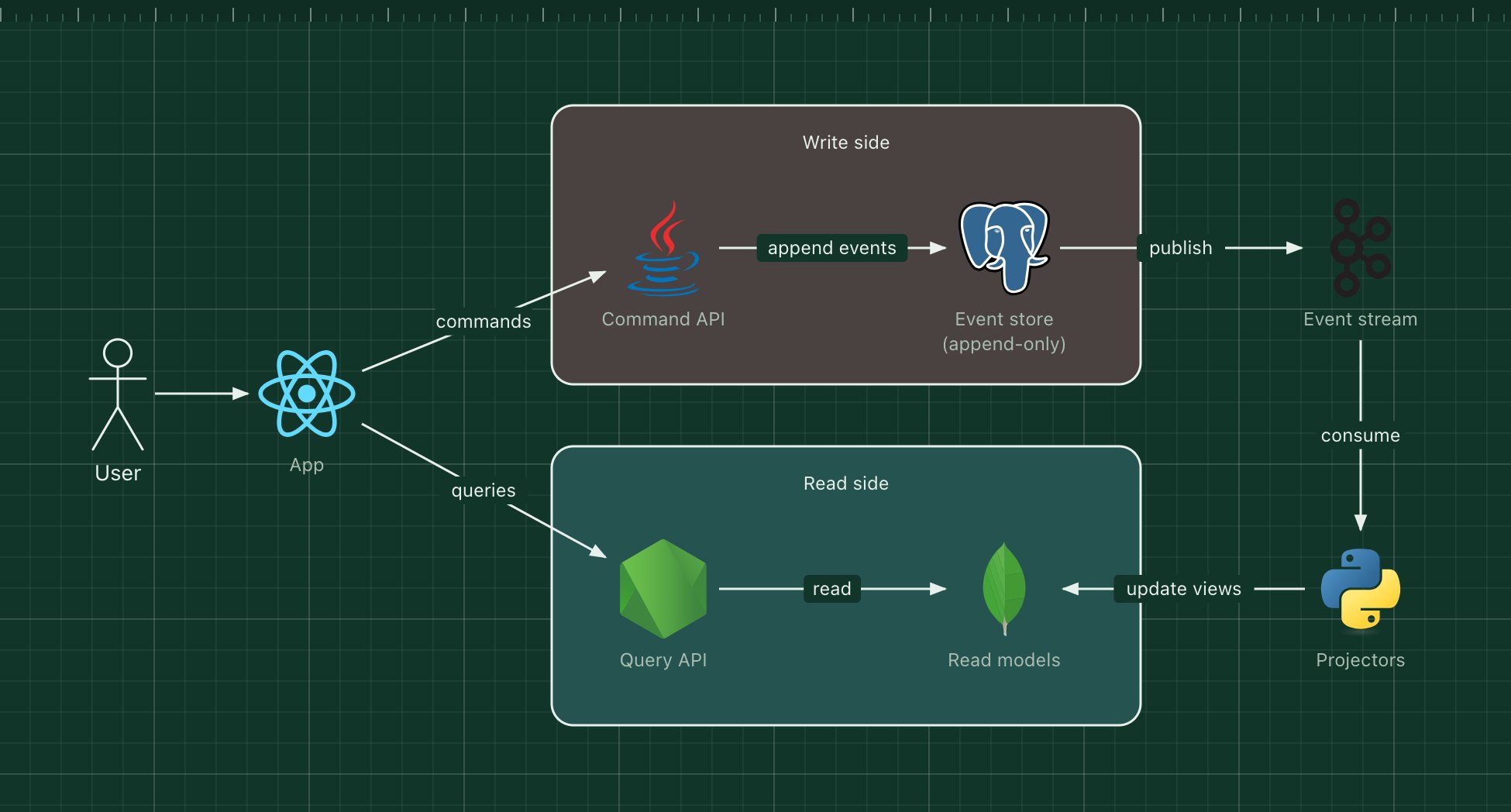
It is usually paired with CQRS (command query responsibility segregation): writes go through one model that validates commands and appends events, and reads come from separate views built for the queries the app needs.
What's in the diagram
- Command API
- Loads an entity's events, checks the command against the business rules and appends new events.
- Event store
- An append-only log of events per entity, with optimistic concurrency so two commands cannot conflict silently.
- Event stream (Kafka)
- Publishes stored events to anything that needs to react.
- Projectors
- Read events in order and update the read models, one view per use case.
- Read models (MongoDB)
- Denormalized documents shaped like the screens that display them.
- Query API
- Answers reads straight from the read models, with no joins or business logic.
How a request flows through it
- The user sends a command, for example "withdraw 50".
- The command API replays the account's events to get the balance, checks the rule, and appends MoneyWithdrawn.
- The event is published on the stream.
- A projector updates the "account summary" read model with the new balance.
- The next query reads the updated summary; reads may lag writes by a moment.
When to use this architecture
Use it when the history itself matters, as in finance, bookings, inventory and audit-heavy domains, or when many different read views must be built from the same changes. It is a poor default for simple CRUD: it adds eventual consistency, event versioning and replays to think about.
Ways to adapt the template
- Add snapshots so long-lived entities do not replay thousands of events.
- Use a dedicated event store such as EventStoreDB instead of PostgreSQL.
- Rebuild a read model from scratch by replaying the stream into a new projector.
- Version event schemas and upcast old events when their shape changes.
How to customise this diagram
- Open your copy. Click Open in the editor. The template opens as your own project, saved in your browser. Nothing is uploaded.
- Rename the parts. Double-click any label, such as “App”, type your own name, then click outside it. Arrow labels work the same way.
- Swap a technology. Select App and press Delete. Search the icon palette for the technology you use, drag it onto the board, and reconnect it by dragging its arrow handle onto the next component.
- Add what is missing. Drag more icons or shapes onto the board. Shapes include databases, servers, users, queues, mail, alerts and scheduled jobs.
- Adjust the zones. Zones are rounded rectangles with a fill colour. Resize them to fit, pick another colour from the selection bar, and press [ to send a zone behind the components.
- Export or share. Save the diagram as a PNG with the camera button, download the project as JSON with Export, or copy a link with Share.