Real-time chat with WebSockets architecture diagram
Chat needs messages to reach other people within a fraction of a second. WebSockets keep a connection open between each client and a server, so the server can push messages instead of waiting to be asked.
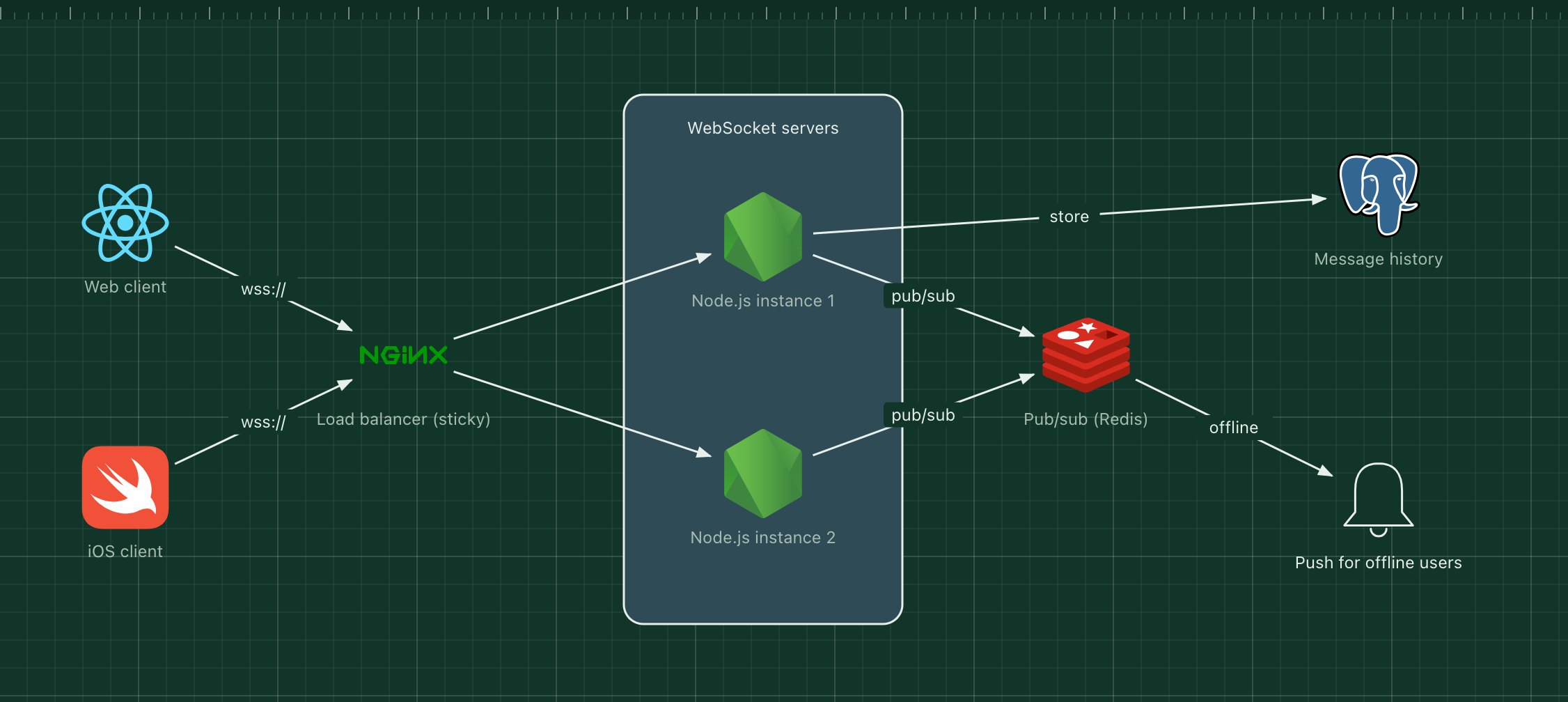
The difficulty is scale: two users in the same room may be connected to different servers. This template uses Redis pub/sub so every server hears every message for the rooms its users are in.
What's in the diagram
- Web and iOS clients
- Open one WebSocket connection each and reconnect automatically if it drops.
- Load balancer (sticky)
- Upgrades HTTP connections to WebSockets and keeps each client on the same server.
- WebSocket servers (Node.js)
- Hold thousands of open connections each and relay messages for the rooms their clients joined.
- Pub/sub (Redis)
- Broadcasts each message to every server subscribed to that room.
- Message history (PostgreSQL)
- Stores messages so clients can load earlier conversation and catch up after reconnecting.
- Push for offline users
- Sends a mobile notification when the recipient has no open connection.
How a request flows through it
- Alice, connected to instance 1, sends a message to a room.
- Instance 1 saves it to PostgreSQL and publishes it on the room's Redis channel.
- Every server subscribed to that channel, including instance 2, receives it.
- Instance 2 pushes it over the open WebSocket to Bob, who is in the same room.
- Members without a connection get a push notification instead.
When to use this architecture
Use it for chat, collaborative editing, live dashboards and multiplayer features. Plan for reconnects from day one: clients must resume from the last message they saw, which is why history lives in a database and not only in memory.
Ways to adapt the template
- Use Redis Streams or Kafka instead of pub/sub if servers must not miss messages during a restart.
- Add presence (online, typing) as short-lived keys in Redis.
- Use a managed real-time service if you would rather not run WebSocket servers.
- Shard rooms across Redis instances once one instance becomes the bottleneck.
How to customise this diagram
- Open your copy. Click Open in the editor. The template opens as your own project, saved in your browser. Nothing is uploaded.
- Rename the parts. Double-click any label, such as “Web client”, type your own name, then click outside it. Arrow labels work the same way.
- Swap a technology. Select Web client and press Delete. Search the icon palette for the technology you use, drag it onto the board, and reconnect it by dragging its arrow handle onto the next component.
- Add what is missing. Drag more icons or shapes onto the board. Shapes include databases, servers, users, queues, mail, alerts and scheduled jobs.
- Adjust the zones. Zones are rounded rectangles with a fill colour. Resize them to fit, pick another colour from the selection bar, and press [ to send a zone behind the components.
- Export or share. Save the diagram as a PNG with the camera button, download the project as JSON with Export, or copy a link with Share.