Video upload and streaming architecture diagram
Video platforms never stream the file that was uploaded. They transcode it into several resolutions and bitrates, cut each into short segments, and let the player switch quality as the viewer's connection changes. This is adaptive bitrate streaming.
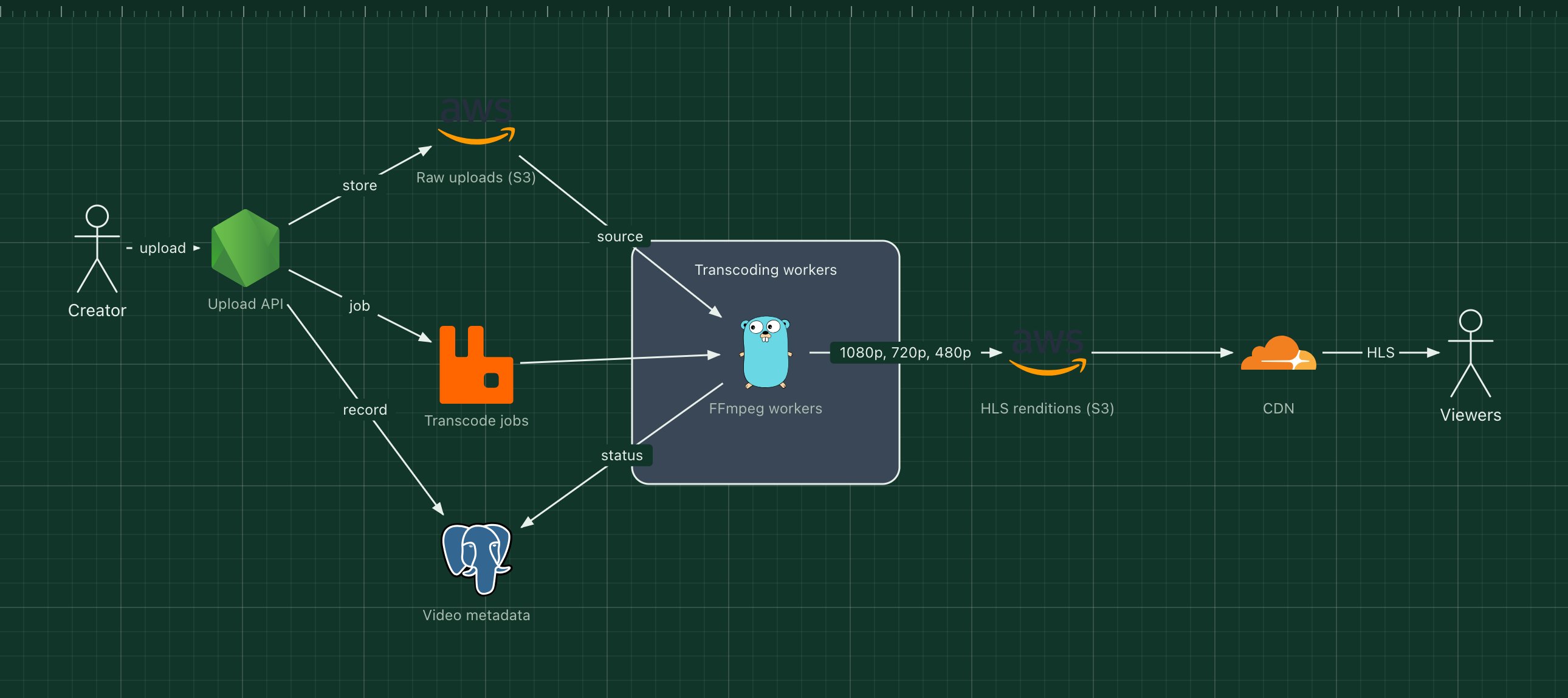
This template shows that pipeline: uploads land in object storage, a queue spreads transcoding across workers, and a CDN serves the resulting HLS segments to viewers.
What's in the diagram
- Upload API
- Authenticates the creator, records the video and stores the original file, often through a pre-signed upload URL.
- Raw uploads (S3)
- The original files, kept so videos can be re-encoded later with better settings.
- Transcode jobs (RabbitMQ)
- One job per video, so slow encodes never block uploads and workers can scale with the backlog.
- FFmpeg workers
- Encode each rendition, cut it into segments and write an HLS playlist.
- HLS renditions (S3)
- Segments and playlists for each quality, ready to be served as plain files.
- CDN
- Caches segments near viewers. Popular videos are served almost entirely from cache.
How a request flows through it
- The creator uploads a file; the API stores it in S3 and records the video as "processing".
- The API puts a transcode job on the queue.
- A worker downloads the source and encodes 1080p, 720p and 480p renditions with FFmpeg.
- It uploads the segments and playlists to S3 and marks the video "ready".
- The player loads the master playlist through the CDN and switches between qualities as bandwidth changes.
When to use this architecture
Use it when video is central to your product and you need control over quality, cost or processing. If video is a side feature, a managed video API is usually cheaper than running encoders, storage and a CDN yourself.
Ways to adapt the template
- Use GPU instances or a managed transcoding service for faster encodes.
- Add DASH output, or CMAF segments that serve both HLS and DASH players.
- Generate thumbnails and captions in the same worker step.
- Protect premium content with signed CDN URLs or DRM.
How to customise this diagram
- Open your copy. Click Open in the editor. The template opens as your own project, saved in your browser. Nothing is uploaded.
- Rename the parts. Double-click any label, such as “Upload API”, type your own name, then click outside it. Arrow labels work the same way.
- Swap a technology. Select Upload API and press Delete. Search the icon palette for the technology you use, drag it onto the board, and reconnect it by dragging its arrow handle onto the next component.
- Add what is missing. Drag more icons or shapes onto the board. Shapes include databases, servers, users, queues, mail, alerts and scheduled jobs.
- Adjust the zones. Zones are rounded rectangles with a fill colour. Resize them to fit, pick another colour from the selection bar, and press [ to send a zone behind the components.
- Export or share. Save the diagram as a PNG with the camera button, download the project as JSON with Export, or copy a link with Share.