Microkernel (plug-in) architecture
A small core with extension points, and features added as independent plug-ins.
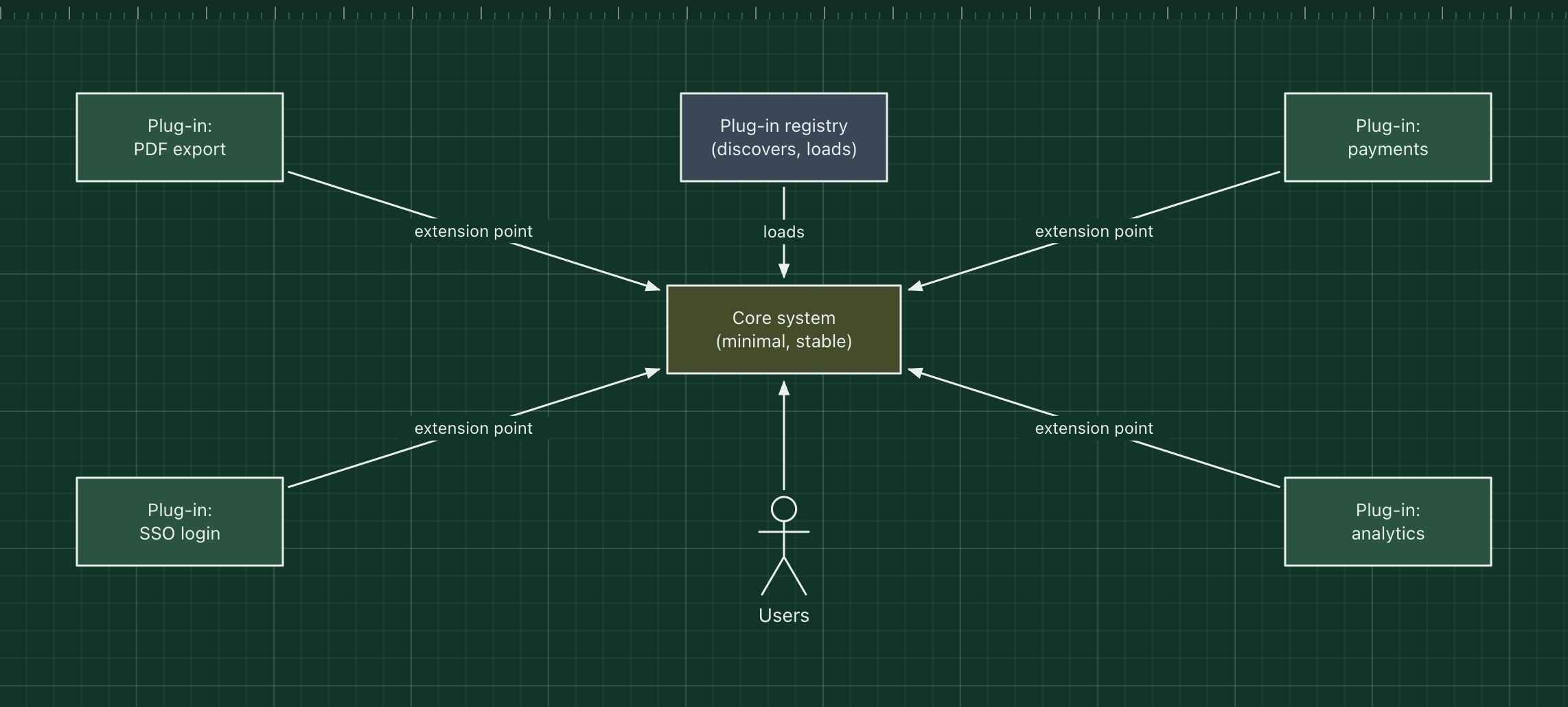
In a microkernel architecture a small core system provides the essential workflow and a set of extension points. Everything else is a plug-in: an independent module that registers itself with the core and adds a feature through those extension points, without the core knowing the details.
You use it every day. Browsers, IDEs such as VS Code and Eclipse, WordPress and Jenkins are all built this way. It also suits products sold with optional modules, or rules that differ per customer.
The parts of the pattern
- Core system
- The minimum needed to run: the main workflow and the plug-in contract. It changes rarely.
- Extension points
- Stable interfaces or hooks where plug-ins attach, such as "add a menu item" or "handle a payment".
- Plug-in registry
- Finds plug-ins, checks versions and loads them at start-up or at run time.
- Plug-ins
- Independent features. They depend on the core's contract, not on each other.
How it works
- At start-up the registry finds the installed plug-ins and loads them into the core.
- Each plug-in registers handlers for the extension points it uses.
- When a user triggers a workflow, the core runs it and calls the registered plug-ins at each extension point.
- Adding a feature means installing a plug-in; the core is not rebuilt.
When to use it, and when not to
Good fit
- Products with optional or third-party features: editors, CMSs, build servers.
- Per-customer or per-region rules that you do not want in the core.
- You want outside developers to extend the product safely.
Think twice
- The "core" keeps growing because every feature needs a new extension point.
- Plug-ins need to talk to each other a lot, which recreates a tangled system with extra steps.
- You cannot maintain a stable, versioned plug-in API.
Edit this diagram
Click Open the diagram in the editor to get your own copy, saved in your browser. Rename the boxes to match your system, swap the generic boxes for technology icons from the palette, then export a PNG, SVG or PDF, or share a link. No sign-up.